Elementor: A Practical Introduction to a Modern WordPress Page Builder

When building a WordPress website today, a page builder often becomes the foundation of the entire workflow. The goal is simple: design layouts visually while still keeping enough technical control for performance and maintainability. The plugin Elementor is one of the most widely used tools in this category, and it has evolved significantly with a focus on cleaner output and better performance.
This article gives a technical but approachable overview of how Elementor works, what problems it solves, and why the introduction of the atomic editor in Elementor 4 is relevant for modern WordPress development.
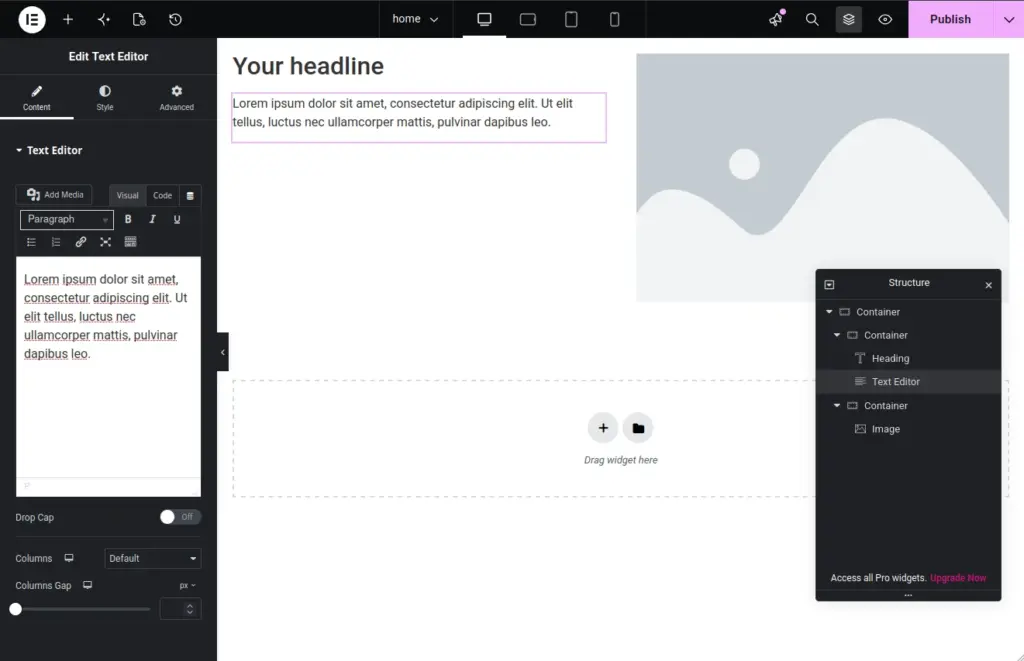
What Elementor is and why it matters
At its core, Elementor is a WordPress page builder that replaces the need for hand-coded layouts in many common scenarios. Instead of writing HTML, CSS, or JavaScript for every section, you construct pages using a visual editor.
The main value lies in reducing friction between design and implementation. For beginners, this means being able to build a full website without touching code. For experienced developers, it becomes a rapid prototyping tool or even a production-ready layout system when extended with custom widgets and dynamic data.
A typical use case might be a landing page with hero sections, feature grids, and call-to-action blocks. Instead of manually structuring these elements, you drag components into place and adjust properties visually.
Key features of Elementor
Visual page building with precise control
The editor allows you to construct layouts with pixel-level accuracy. Every section, column, and widget can be adjusted in real time. This is especially useful when translating design files into WordPress without losing fidelity.
Flexible structure for any layout
Unlike older short-code based builders, Elementor uses a hierarchical layout system. Sections contain columns, and columns contain widgets. This structure maps more closely to modern front-end practices like flexbox layouts, making it easier to reason about page structure.
Atomic editor and performance improvements in Elementor 4
One of the more important architectural updates is the introduction of atomic widgets in Elementor 4. Instead of generating large, nested HTML structures for each component, the atomic editor reduces redundancy in the output.
This means:
- Less unnecessary wrapper markup
- Cleaner DOM structure
- Reduced CSS complexity in many layouts
From a developer perspective, this is significant because page builders often get criticized for bloated HTML. The atomic approach moves Elementor closer to a component-based system where each widget is more self-contained and efficient.
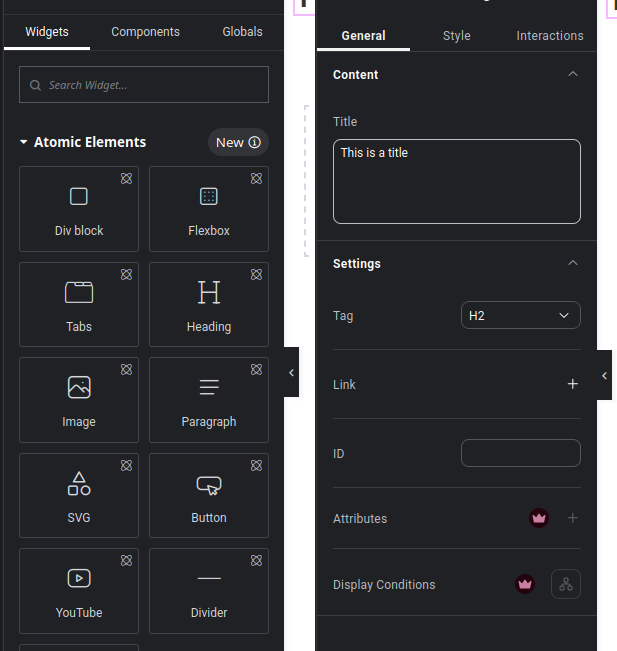
Practical example: building a landing page section
A common scenario is creating a hero section with a headline, subtitle, and call-to-action button.
With Elementor, the workflow looks like this:
You create a full-width section, define spacing and alignment, then drop in a heading widget, a text widget, and a button widget. Each element can be styled independently without writing CSS.
For more advanced users, custom CSS can still be applied at widget or section level. This hybrid approach is useful when you need precise control while still benefiting from visual editing.
Installation and setup
Installing Elementor in WordPress is straightforward and follows the standard plugin workflow.
- Open your WordPress dashboard
- Navigate to Plugins → Add New
- Search for Elementor
- Install and activate the plugin Elementor
After activation, you can start editing pages directly or create a new page and select “Edit with Elementor”. The editor will load in a full-screen interface where you can begin building layouts immediately.
No additional configuration is required for basic usage, but advanced features like theme building or dynamic content may require Elementor Pro.
Performance and compatibility considerations
Page builders naturally introduce additional frontend overhead, and Elementor is no exception. However, recent versions, especially with the atomic editor improvements, focus on reducing unnecessary markup.
Performance depends heavily on how it is used. A page filled with many nested sections and heavy widgets will still impact load time, regardless of optimization improvements.
Compatibility is generally strong across modern WordPress themes. Most well-maintained themes are designed to work with Elementor out of the box. Conflicts typically arise only with heavily customized themes or plugins that modify core rendering behavior.
From a technical standpoint, it is still important to combine Elementor with caching, optimized images, and minimal plugin usage to maintain good performance.
Conclusion
Elementor remains a practical solution for building WordPress websites visually while still offering enough flexibility for developers. The introduction of atomic widgets in Elementor 4 addresses one of the long-standing concerns around generated markup and performance overhead.
For beginners, it lowers the barrier to building structured layouts. For experienced developers, it provides a faster way to prototype and deliver UI without abandoning control when needed.